Managing your account
Account settings
You can access you account settings from the menu in your profile picture. Here you can manage your personal details, profile visibility and general settings like time zone, color theme, currency and measurement units. Some settings worth noting:
Privacy and sharing
Here you can toggle what you would like to be shared and visible from your profile.
Share measurements
If this is toggled on then your bust, waist, hip and height measurements will be shared on your profile and shared projects (that are made for you). For this to work, make sure you have measurements added with a "Me" bubble.
Share fabrics and notions
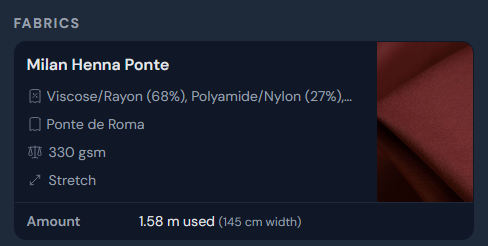
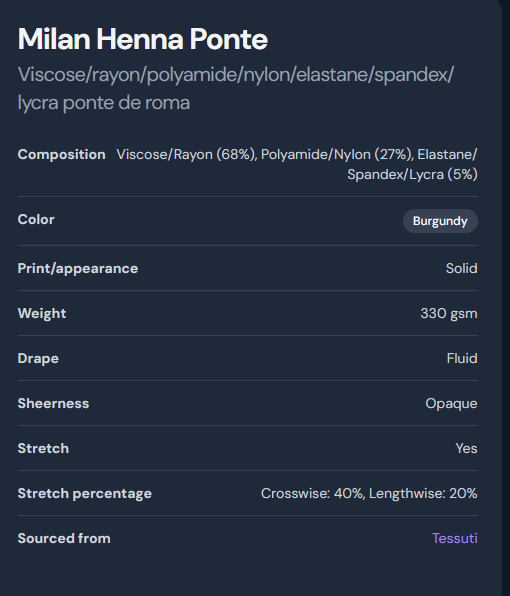
If this is toggled on, then your fabric/notion stash will be visible on your profile. Others will also be able to click into fabrics and notions of your shared projects to get more details such as drape, sheerness, stretch and source shop.
If you would like to share your fabrics and notions while keeping sourcing information such as your location or personal names private, you may prefer to toggle off 'share sources' in your settings.
Share measurements
If this is toggled on then your bust, waist, hip and height measurements will be shared on your profile and shared projects (that are made for you). For this to work, make sure you have measurements added with a "Me" bubble.
Share fabrics and notions
If this is toggled on, then your fabric/notion stash will be visible on your profile. Others will also be able to click into fabrics and notions of your shared projects to get more details such as drape, sheerness, stretch and source shop.
If you would like to share your fabrics and notions while keeping sourcing information such as your location or personal names private, you may prefer to toggle off 'share sources' in your settings.
Share patterns
If this is toggled on, then your pattern stash will appear on your profile.
Preferences
In this section, you can change your platform settings, like your preferred color theme, time zone, unit, currency, first day of the week, etc.
Here you can also choose to disable the delete confirmation stage when you delete projects.
Here you can also choose to disable the delete confirmation stage when you delete projects.
Personal pattern designer
When you sign up to threadloop, you get given a personal designer for use with self-draft patterns if desired - it's private by default. Here you can edit the designer details.
Data export
If you select the 'data' tab, you can generate a csv export of all your Threadloop data. This will be emailed to you as a zip file.
January 21, 2026