Pattern database
Adding new patterns
If a pattern is missing from the database, you can add it! Remember that you're contributing to a shared sewing pattern database. The more care you put into the details, the more useful it becomes for the whole community.
Important note
Please make sure that you are not adding a duplicate. The pattern you are looking for might be added under a slightly different name, so check carefully before adding it.
How do I add a new pattern?
Go to the pattern database ('Patterns' in the navigation), and click the 'New pattern' button in the corner of the page.
Before you add your first pattern, please read carefully through the guidelines. If you're adding a paper (envelope) pattern, you will also want to have a look at the visual guide for paper patterns.
Guidelines
- Only add sewing patterns
Do not add knitting patterns or other types of crafts, like glued foam costumes. Sewing needs to be involved. - Avoid duplication
We only want any pattern listed once to ensure all related resources (projects, reviews) and data are as correct and relevant as possible. - Stick to the naming convention
Using the official naming convention ensures Threadloop's search can find the pattern and reduces duplication. - Use good quality images
Ensure the images don't have navigation elements (your phone bar, arrow buttons, etc) and are clear & large enough to read. Add multiple relevant images to improve the experience for everyone. - Fill in all available information
The more information you include, the more powerful the database becomes - not just for you, but for the entire Threadloop community. Not all information is always available, but strive to enter what you can. - The pattern database is for everyone
When you enter a pattern, remember that it’s not about the copy you own, it’s about the pattern as a whole. That means you shouldn’t use the public fields for personal notes, and you should include all sizes, not just the variant you own. Details about your copy can go into the private "My Details" tab at the bottom of the pattern page.
If you have any questions or special cases, feel free to ask the community in the discussion boards.
Overview of the form
Only some of the fields are required, but most should be filled out even if they are not required. The pattern form is divided into parts:
Pattern details
Pattern designer(s)
You can add several designers to a pattern, for example if it's a collaboration between two designers or a designer and a publisher.
If you can't find the designer you are looking for, you can add a missing designer. Please make sure you're not making a duplicate, they might be listed under a slightly different name. If you can't find the designer, but it also won't let you make a new one because it "already exists" then report this as a bug and the Threadloop team can help out. This usually means it exists as a private designer.
For self-drafted patterns, use the ‘Self-drafted?’ button above the Designer field. Every Threadloop user has a personal designer automatically created for themselves that is private by default. You can edit your personal designer from account settings.
Name
Always use the official pattern name that the pattern was published with. You can often simply copy the pattern name from the designer's website or the back of a pattern envelope.
Do not include the designer, brand, or words like 'sewing pattern' in the pattern name.
Depending on the pattern designer, there might be a naming convention you should follow to minimize the chance of duplication. It may help to take a look at patterns already added for that designer.
- For commercial "big 4" patterns: Pattern Number | Description. The pattern number should include the letter prefix found on the envelope only where it was published with one. It should not include one if it wasn't published that way. Examples: "M7757 | Misses' Top and Pants", or "2438 | Misses' Dress".
- For Burda Style Magazine: NNN | Burda Style MM/YY is used. For example "103 | Burda Style 01/18". Related variants are entered separately if they have different numbers, but views such as A, B are combined. The same basic convention is used for all other Burda magazine titles.
Special cases - Reissued patterns, multiple size ranges and bundles
Whether a reissued pattern is to be "merged" with it's original or left separate is a nuanced consideration. The general guideline is:
- If the pattern was reissued under a new number or brand without any technical changes (such as size range, design, format) then it is merged. Example: S9285 & B6031.
- If the reissue has been re-drafted, or has substantial changes in design or size range, it is separate. This covers most Big 4 vintage reproductions that are re-sized to modern charts, instructions and conventions. Example: Simplicity S1590 is a reproduction of 2027.
- If a similarly designed pattern has separate size drafts within the same age group and different names/pattern numbers, then it is separate. Example: S9598 | Misses' Knit Dresses & S9599 | Women's Knit Dresses.
- If a pattern has variants across age groups and is sold separately, such as an Adult and Child version of the same design, then they are separate.
- If a pattern includes multiple size ranges in the same purchase then it is merged.
Note this does not include bundle deals in which the separate sizes can be purchased separately - these should be separate, and added to stash as their individual parts.
Description
Include a description of the pattern. This can be copied from the product listing on a designers' website, or the description on the back of the paper envelope.
If there is no available description, please do your best to describe the style features of the pattern, like "Sleeveless floor length dress with V-neck (...)".
Do not include information in the description that should be filled in other fields, like fabric recommendation and size details.
Note that English is the primary language of Threadloop - if a pattern is available in English, please make sure to use the English language information for the description and name.
Some designers have asked not to have their images and/or text included in the Threadloop database. Please note designers that include a Threadloop copyright warning notice. The notice will appear in the edit screen. If this notice disallows text, then please do not copy from the designer website but describe it only in your own words.
Pattern type(s)
Choose one or more pattern types to categorize the pattern. Either type into the field to search, or scroll in the list to find what you're looking for. You can include multiple types for a pattern. Please only include types that the pattern was designed for, not types that it could potentially be changed to.
If the pattern you're adding is an ad-on or extension for another pattern, select the type 'Extension/add-on' as well as the type(s) of the original pattern.
Format
Include all formats that this pattern has been published in, even if some are no longer available.
- PDF: Available as a digital download often as .pdf file type. Some bundles are described as ebooks but are provided in standard pdf form, which counts for PDF here.
- Paper: These are traditional printed patterns - for example commercial patterns. Don't use this for PDF patterns you've printed yourself.
- Book: Included in a published book. This generally refers to hardcopy books that may have ebook (epub) versions available. If the patterns are downloaded separately, select both book and PDF.
- Magazine: Print periodicals such as Ottobre or Burda Style that include patterns, usually as inserts.
- Tutorial: A pattern provided informally, often as a blog post or YouTube video. This is not for formal patterns with accompanying tutorials or sew-alongs (this is captured in 'File Features').
Note that while Book and Magazine are available formats, you should not add entire books as one pattern. Add each pattern individually.
Sewing level
Select a level here if the pattern provides some official difficulty or skill level.
Hashtag
An official Instagram hashtag for the pattern. Do not make up a hashtag, use thematic tags like #vintage, or general hashtags like #ClosetCorePatterns.
Each word here will turn into a link to instagram for easy viewing. Avoid spaces in your hashtag, as each will become an individual tag.
Release date
Select the release date of the pattern, which helps filtering by time as well as the New Patterns feed on the homepage. The release date can often be found in blog posts, newsletters or Instagram announcements about the pattern release.
If you don't know the exact release date for a pattern, you can just enter the year (for example 1960), and the day and month will default to January 1st.
Free
If it can currently be downloaded or accessed for free officially - even if that requires a newsletter signup, joining a social media group, or is also currently available as a paid pattern, the pattern is considered "free". If it used to be free but isn't now, it is no longer considered "free".
Unavailable
Select this if the pattern is out-of-print or no longer available through official distribution in all formats. Sometimes patterns will be out-of-print but still available in PDF, or only in some languages, and these should remain as 'available'. Please do not add links to unofficial sources or share content without the permission of the copyright holder.
Exclusive to membership, course, etc
Select this for patterns that are unavailable individually. For example through subscription memberships, Patreon memberships or patterns that come only with a course, class, or kit.
Images
Include as many high quality photos as relevant. This can include tables and information, technical drawings and modelled samples, especially if sample images are available in a range of sizes. Don't upload photos of instructions or pattern pieces in it's entirety, as this can breach copyright.
The first image will become the cover image; preferably a clear photographed sample of the garment or item. To rearrange photos, drag and drop them into the right order.
For paper envelope patterns, please include both a full front and full back envelope. If you're photographing paper patterns, don't crop them down - include the entire front and back of the envelope. It's best not to hold patterns in your hand to photograph, as it can obscure information. If some background is visible, please try to use a plain single color background, for example: a table or box. The guideline about avoiding text or graphics doesn't relate to official info for the pattern! Use the front of the pattern as the main image.
Try not to screenshot images, but save (or copy) the entire high-quality image. Keep in mind image sizes - a thumbnail preview image might look just fine on your phone, but be unusable on a bigger screen.
You can copy-paste images into the page or dashed 'drop zone' for easy upload, and there is a small edit button on the thumbnail of an uploaded image if you need to do simple editing or cropping.
Once you’ve added an image, you can add captions and alt text to describe the images which helps make the database more accessible - it’s a big help for people using screen readers.
Please be mindful if the pattern has a copyright notice applied to images. You can upload images of your own projects here! Remember to add a caption crediting yourself.
Size and fit
Age group and body type
Select the age and body type as provided by the designer and the draft and size chart indicated. This is intended to capture the shape and size a pattern was drafted to fit, not who can wear it. There are many types of patterns that can be unisex, but if it was drafted on the Men's size chart then it should be classified as Masculine, and Misses' patterns should be Adult even if a teenager can wear it.
Custom sizing
This toggle should be selected if the pattern is drawn up or generated to fit any measurements. Things like tutorials for gathered skirts, drafting instructions or parametric patterns without size constraints. Don't use this for patterns that simply include multiple sizes.
Size range
A text description for the entire range of sizes this pattern comes in, including the country and size type if applicable. Please be mindful that some patterns split the size groups for purchase. For example, a Big 4 pattern may have two envelopes of sizes and would be listed as: US Misses' 8-16, Women's 18W-24W or EU Petite 17-21
Cup sizes
If the pattern specifies the cup size or has multiple cup sizes, select them here. For simplicity, the cup sizes are listed as A-N. Sometimes designers refer to 'DD' - this will translate to E on Threadloop.
Min/max measurements
Input the minimum and maximum measurements for bust and hip as per the pattern's entire available size range. Note this is body measurements, not finished garment measurements. You can toggle between cm/inches here, it's usually best to input the unit native to the designer and pattern.
This information is crucial to be able to filter the pattern database by size, so please don't skip it.
Specifications
Language
Select all languages the pattern is available in to your knowledge.
File features
Many of these are only relevant to PDF's but it does include other digital features
- Projector support - only select this if the pattern includes a separate projector file. Projector files have special features, and are not just A0 (For example, grainlines aligned, layered sizes, and unfolded pieces that would otherwise be on a fold).
- A4/Print-at-home - Home printer sizes, often A4 or US Letter, that must be tessellated.
- A0/Copyshop - Wide-format printer sizes or 'real format'.
- Layered sizes - For PDF layers, not just 'nested' size lines. If you can deselect sizes for printing, then it's layered.
- Video instructions - there is an accompanying video tutorial or sewalong available.
Source
URL
The official (first-party) URL where the pattern is or was available for purchase or download. A branded website is preferred over marketplace websites like Etsy, if available.
Please don't include third-party resellers (like fabric stores or The Foldline), affiliate links, or other review/DB websites like Pattern Review.
Second size range URL
Secondary URL field for additional size ranges, if they are located on separate web pages. Do not use this field for anything else, as it will be displayed on the pattern page as a link to Additional size range.
Supplemental URLs like video sewalongs or pattern "hacks" can be added as a comment in the pattern discussion.
Publications
This is for books or magazines that contain the usable pattern, so not for counter catalogues, publishers, or dates. This is the periodical name, such as Burda Style, not the specific issue like 11/2025.
The name as printed on the cover is generally preferred, but some long running and multilingual magazines can get convoluted so double check for existing publications before adding a new one. We should have most major magazines already in Threadloop.
Once you select a Publication, there will be a new optional field for Issue of [Publication]. This is where you enter the issue like 11/2025 or A/W 2025. For existing publications, check the convention already being used.
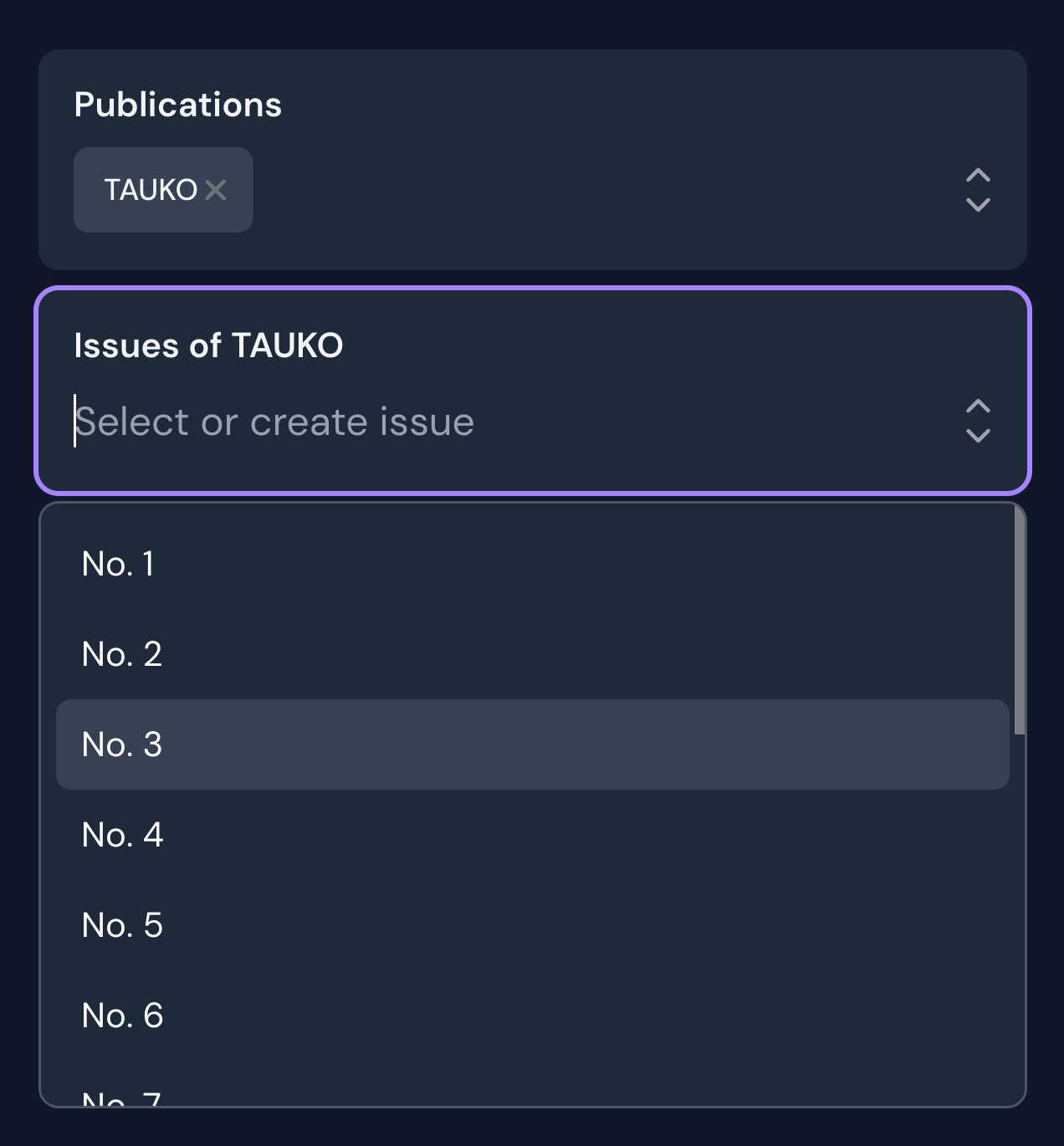
If you can't find the publication in the list, you can create it by clicking the "Create new" link in the dropdown (you might have to scroll down to the bottom of the dropdown to find this link)
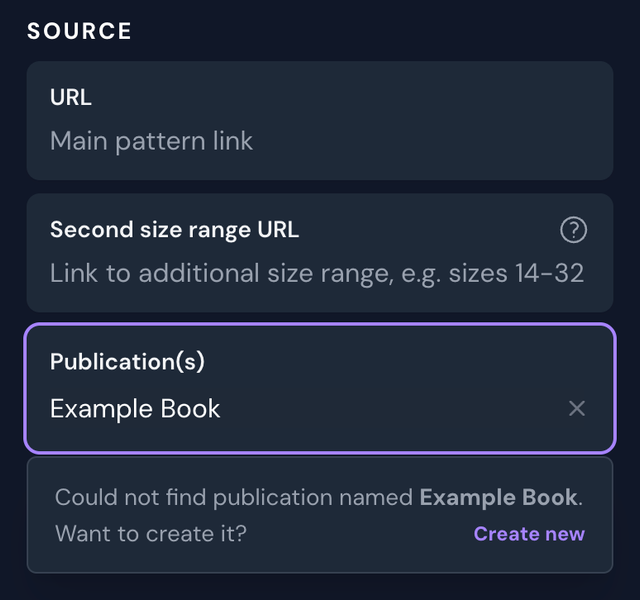
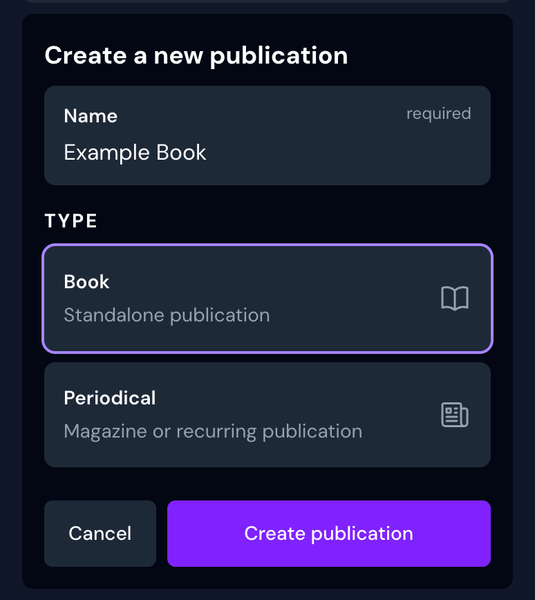
Make sure that you're not creating a duplicate, and choose between book or periodical (magazine).
If you create a new Periodical, you will get a new field below to choose which issue your pattern belongs to. Creating a new issue is similar to creating a new publication, where you enter the name of the issue (e.g. 06/2024) as well as the publication date.
Add to my stash
Toggle this off when you are adding a pattern that you don't own! Otherwise it will be stashed automatically.
Can I add private patterns?
The pattern database is community based, and patterns are shared by default. Threadloop shouldn't be used to privately add publicly available patterns.
To add a private, unreleased patterns, click 'Add a private pattern' at the top of the page.
Private patterns are for self-drafted or unreleased designs only, so the form is kept minimal. If others could benefit from this pattern, consider adding it publicly instead. Do not add self drafted, private patterns to the public database.
Design details
Once a new pattern is saved, you can tag it with design details to make it easier for everyone to search and filter for.
Now that everything is done, you can add it to your own Project, or to a Pattern list, or refer to it in a discussion by using the ![name] format link. Have fun!